Skip to content
EveryLoading
  • About EveryLoading
  • User manual
  • FAQ
  • Free tools
Integrations
  • Road transport
  • Sea freight
  • Air cargo
  • Manufacturing
  • Palletizing
  • Retail and distribution
BlogContact
Log in
Create free account

About

  • About EveryLoading
  • User manual
  • FAQ

Use cases

  • Road transport
  • Sea freight
  • Air cargo
  • Manufacturing
  • Palletizing
  • Retail and distribution

Free tools

  • Loading meter calculator
  • CBM calculator
  • Pallet fit calculator
  • Container size calculator
  • All free tools
IntegrationsBlogContact
Create free account

Getting started

  • Create your free account and open the planner
  • The planner at a glance

Set up the load

  • Choose a vehicle or container
  • Add cargo
  • Paste or import a packing list
  • Stacking, rotation and shape

Plan the load

  • Optimize the load
  • Move, stack and turn items in 3D
  • Views, camera and display
  • Loading sequence
  • Multi-stop deliveries
  • When it doesn't fit: several trucks

Weight & safety

  • Weight, axle loads and centre of gravity

Save & share

  • Save plans, undo and redo
  • PDF load plans and share links

Account

  • Plans, subscription and billing
  • Keyboard and mouse shortcuts
  • Switching from another load planner
User manual / Set up the load

Add cargo

Type items into the cargo table or start from a standard pallet.

Video tutorial · 0:28 · the steps are also written out below

Each row in the Cargo tab is one kind of item: a name, its size, the weight of one piece and how many there are.

  1. 1Click the empty row that says Type an item name, or paste rows from Excel and type a name.
  2. 2Fill in L, W and H (length, width, height) and KG/PC, the weight of one piece.
  3. 3Set QTY, the number of pieces.
  4. 4Optionally set STOP for multi-drop loads. See Multi-stop deliveries.
  5. 5Press Enter or click Add. Add the next row the same way.
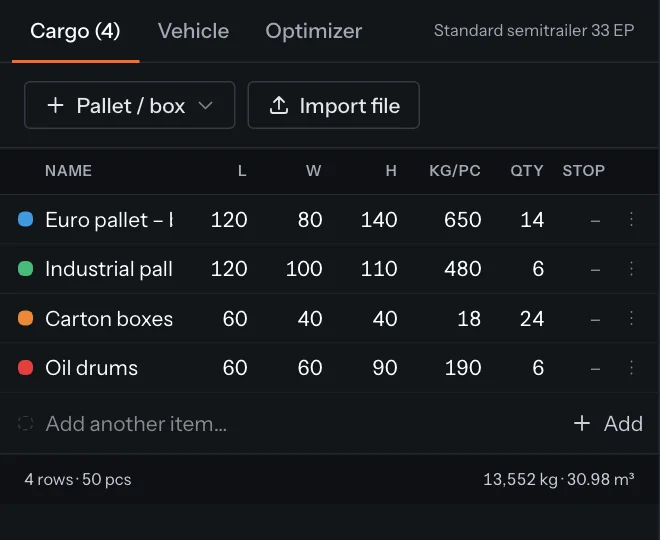
Cargo table with pallets, cartons and drums
The cargo table. Each colour is used for that item in the 3D view.

Standard pallets and boxes

Click Pallet / box to add a common load carrier with typical sizes: Euro pallet, Half Euro pallet, Industrial pallet, US pallet (48×40"), GitterBox, IBC tote, Carton 60×40×40 and Drum 200 L. Change the height, weight and quantity to match your goods.

Your own presets

Open a row's settings (the ⋮ button at the end of the row) and click Save as preset. It appears under My presets in the Pallet / box menu on this computer.

Change or remove an item

Click any cell to edit it. To remove a row, open its settings and click Delete row. If you already optimized, click Re-optimize to place the changed list.

← PreviousChoose a vehicle or containerNext →Paste or import a packing list

Something unclear or out of date? Tell us and we'll fix the page.

On this page

  • Standard pallets and boxes
  • Your own presets
  • Change or remove an item
EveryLoading

Online load planning for trucks, sea containers and air cargo. Works in your browser, nothing to install.

Company

Wolfiz LimitedOffice 5118, 321–323 High RoadChadwell Heath, Essex, RM6 6AXUnited Kingdomsales@everyloading.com+44 7308 515752

Product

  • Try Planner
  • Free tools
  • Loading meter calculator
  • User manual
  • FAQ
  • Integrations
  • Developer API
  • Comparison

Use cases

  • Road transport
  • Sea freight
  • Air cargo
  • Manufacturing
  • Palletizing
  • Retail and distribution

Legal

  • Privacy Policy
  • Terms of Service
  • Sitemap
© 2026 Copyrights reserved by Wolfiz LTD.