The planner at a glance
What each part of the screen does.
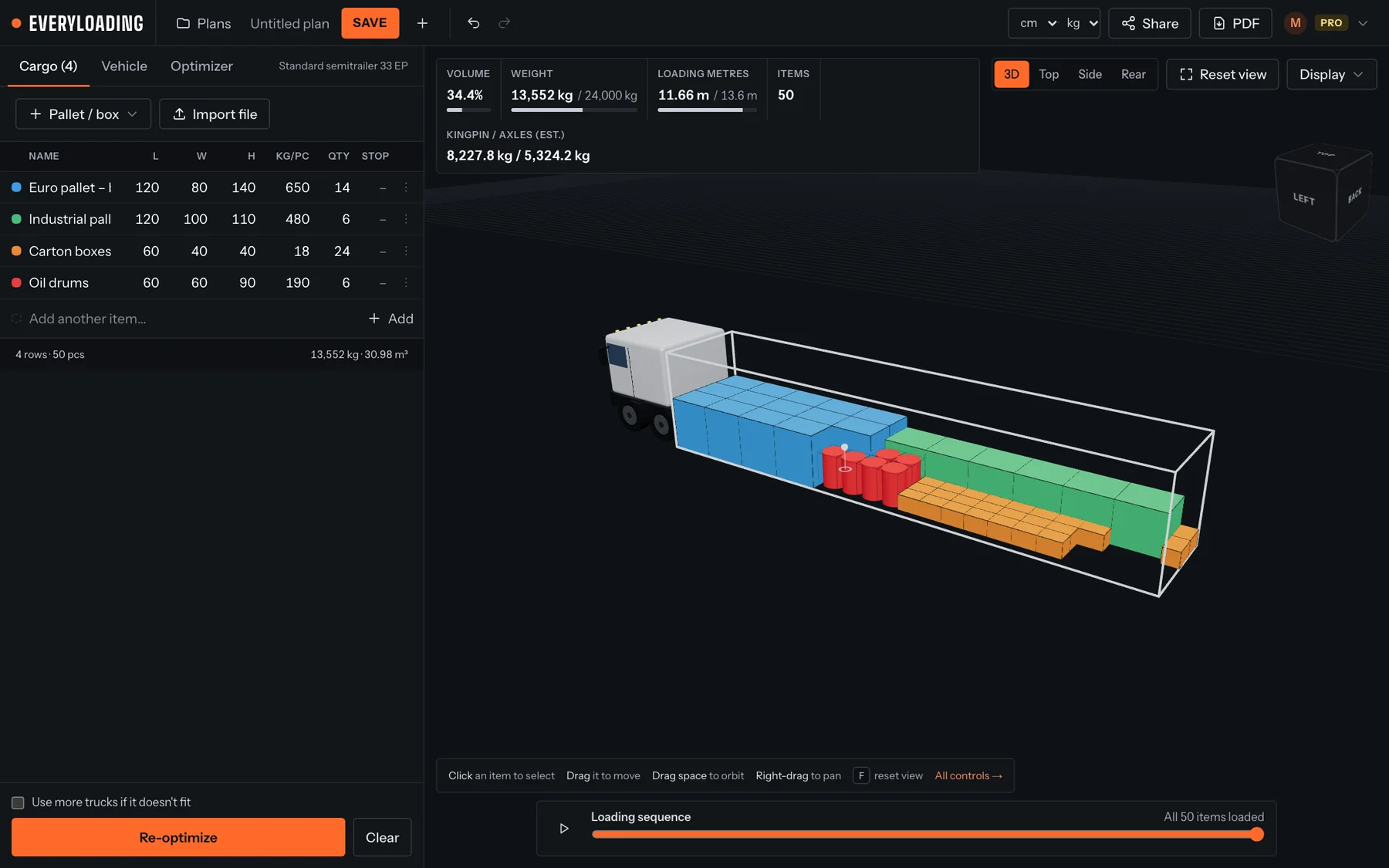
| Area | What it is for |
|---|---|
| Top bar | Plans (your saved plans), the plan name, Save, Save as, new plan, undo / redo, display units, Share, PDF and your account menu. |
| Left panel, Cargo tab | The list of items to load: name, length, width, height, weight per piece, quantity and delivery stop. |
| Left panel, Loading space tab | The truck, container, ULD or pallet you are loading, its inside size, payload, loading side and axles. |
| Left panel, Optimizer tab | How the optimizer orders items and whether it may rotate them. |
| Bottom of the left panel | Use more trucks if it doesn't fit and the Optimize load button. |
| Stats (top left of the 3D view) | Volume used, weight against payload, loading metres, item count, axle loads and anything not loaded. |
| View controls (top right) | 3D, Top, Side and Rear views, Reset view and the Display menu. |
| Loading sequence (bottom) | Plays the load back item by item, in the order your crew should load it. |
Tip
Sizes are entered and stored in centimetres and kilograms. The unit menus in the top bar (cm, mm, m, in · kg, lb) only change how numbers are shown.
Something unclear or out of date? Tell us and we'll fix the page.